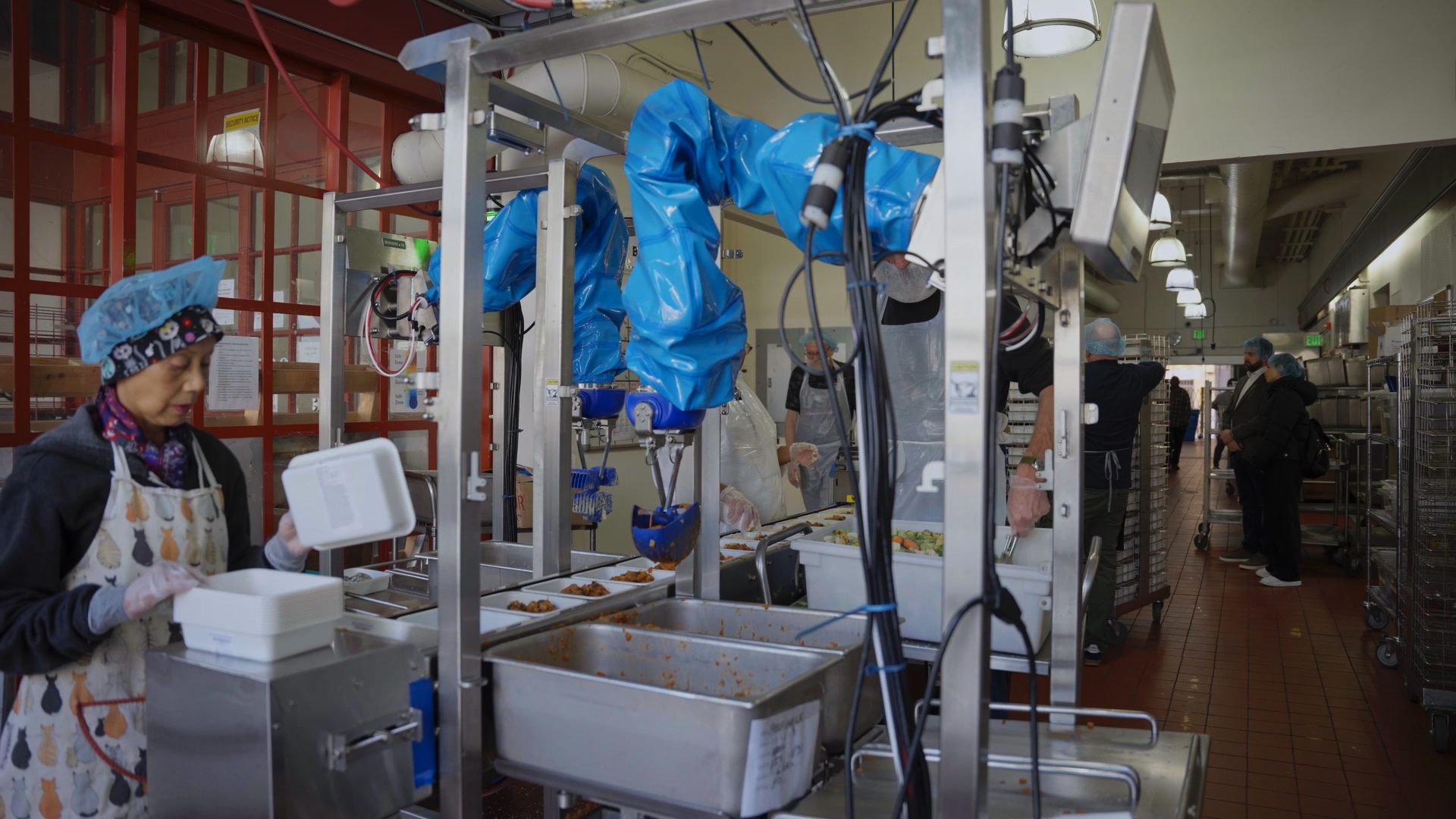
Chef robots assemble meals on production lines in food manufacturing facilities across North America and Europe. Today, Chef robots are in production across 20 customer facilities. When a robot stops serving or starts placing food incorrectly mid-production, our customer loses output and may waste valuable food ingredients. Our team needs to understand what happened and help get the robot back on track as fast as possible.
Remote monitoring lets our engineers investigate and resolve issues without traveling to the customer site. We can view metrics across our entire fleet of production robots, inspect recorded failures, and connect to robots for remote troubleshooting. Four years of production experience have also helped our team recognize problems that may look similar but require different fixes.
This blog explains what we’ve learned from diagnosing failures in the field, the automated triage processes we’ve developed, and how we monitor and support our fleet of robots around the world.
Monitoring robots in a food manufacturing facility
Fleet performance comes down to whether our robots are doing the job our customers expect: placing the right amount of food into the right compartment of a tray at production speed. By observing a robot’s uptime alone (i.e., whether it’s connected to the internet and placing food), we can’t tell whether it’s underportioning or missing trays. This makes remote monitoring more complex for robotics than for pure software products.
The operating context matters, too. A robot that stops for cleaning or for a changeover is behaving as expected, but a robot that stops mid-production needs attention. A lost network connection raises a different question: is our robot down, or is our data delayed?
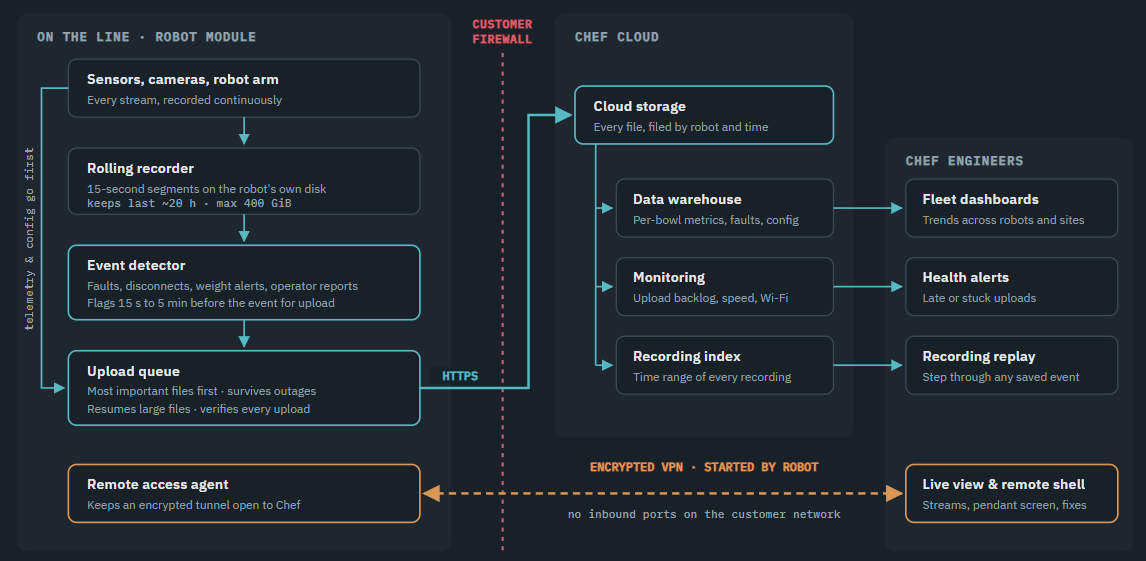
Chef robots run behind customer firewalls and share network bandwidth with the rest of a manufacturing plant. They may be disconnected or shut down before logs finish uploading. Cameras and sensors also generate more data than we’re able to continuously send over a customer’s network. These constraints affect what we record on the robot, what we upload, and when our team can access it.
Three ways to investigate a problem
When a robot stops serving food, the cause could be a software fault, a mechanical problem, an empty ingredient pan, a stopped conveyor, or the food itself. Our engineers use three sources of information to narrow down the cause:
- Fleet metrics and logs: Robots upload metrics and logs to the cloud so our team can review all performance in one place. This is our starting point when investigating an individual robot and comparing its behavior with that of the rest of our fleet.
- Recordings around an event: Errors trigger our robots to preserve a recording of what happened both before and after the event. Our customers can also flag events they want us to investigate. By starting a recording before the flagged event, we get context that would be lost if we started collecting data only after a customer reported it.
- Live access: When a robot is connected to the internet, our team can inspect its sensors and internal state in real time and see the same control panel the customer sees. This helps us understand what’s happening, fix the issue remotely, or work with the customer to resolve it.
Each of these three sources serves a different purpose. Fleet metrics show patterns over time, event recordings let us reconstruct a specific failure, and live access helps us investigate a robot’s current behavior.
Here’s what a remote troubleshooting incident at Chef might look like:
- One day, our on-call support team member got notified that a specific robot at a customer site wasn’t booting up correctly.
- The notification was issued after our automatic fault-recovery software made several attempts to boot up the robot but failed, sending us a fault report via fleet health alerts we’d developed for monitoring.
- The support team member checked the robot’s controller-status history in our fleet telemetry by pulling the data into Foxglove.
- They learned that what looked like a signal loss from the line was actually the robot arm’s safety controller flagging a fault that cut the data link between the arm and our software.
- A controller power-cycle command brought the arm back.
- The line resumed producing food roughly 10 minutes after the fault was detected. Our support team member had diagnosed and resolved the issue remotely without help from anyone at the customer site.
Different types of safety stops
Safety stops are a good example of why remote monitoring is more complex than just looking at an error code. Our robot arm stops when torque exceeds a configured safety limit. Several conditions can trigger that stop:
- Food: A frozen ingredient that hasn’t thawed sufficiently or has clumped together in the pan requires more force to handle than soft, cooked ingredients.
- Environment: Cold-room temperatures can change how our robot arm moves and how grease behaves in its joints.
- Hardware: Wear in a joint can increase the force needed to move it.
Each type of safety stop requires a different response, but to our sensors, every incident looks the same. Our team needs to review each safety stop by looking at the robot’s camera recording and recent behavior, and identify the right fix. By monitoring gradual increases in joint torque, we can also identify where maintenance is needed and service a robot before it comes to a safety stop in the first place.
Building automated triage
As mentioned above, we use metrics, recordings, and live access to remotely investigate issues on our robot fleet. We’re also developing an AI-powered telemetry system to identify likely causes of an issue faster and reduce the amount of manual investigation our team needs to do. The system will:
- Classify events: The robot’s software will analyze camera and sensor data to identify the likely cause of an event, using the kinds of evidence our team examines manually today.
- Send an alert: Our robot will send the event classification and relevant context within seconds of an incident happening, without waiting for a large sensor recording to upload.
- Route the issue: The system notifies our support team or the customer, depending on who can fix the issue.
Our team will still review recorded events and investigate issues thoroughly, but the telemetry system will allow us to resolve issues much faster than before.
Alerting and routing are already in production. Every robot evaluates close to 50 alert rules against its own signals, such as repeated arm faults, a disconnected camera, or a pan marked empty that’s actually full. When a rule fires, the robot notifies our support team, shows issues that line staff can fix on the control panel they already use, and preserves a recording of the event. In the cloud, a diagnostic tool assigns a likely cause, such as a fault, an empty pan, or maintenance, to incidents where a robot wasn’t placing food when it should have.
Classifying events from camera data is something we’re developing right now. Today, our rules tell us what happened, but finding out why still requires an engineer to review the recording. We’re building a classifier that can reproduce those judgments, based on four years of manually reviewed stops on our customers’ production lines.
Making improvements across our fleet
Our robots use a common software stack. This lets us apply a fix made at one customer site to robots at another. We roll out software releases site by site so we can validate changes before deploying them more broadly.
The common software stack doesn’t mean that every robot runs on the same software version at the same time. When errors occur, our team reviews which software version and configuration produced which error. This helps us distinguish software from hardware issues and determine whether any issue is specific to a particular customer site.
Every software release starts with our in-house testing team, who checks for new bugs and regressions in existing behavior before the release is considered ready for the fleet. Once a release passes, we publish detailed release notes and walk everyone involved through them, from support and field engineers to the customer teams. The notes describe what’s changed, how the release will be deployed, and how to roll it back if needed.
We then deploy the release to a single robot at one canary site. Using our alerting and remote monitoring tools, we compare that robot’s production numbers against its performance before the update. Is it missing placements? Is throughput hitting the expected rate? Are portion weights as consistent as before? Only once the release holds up in production, we roll it out to the rest of the fleet site by site. We also log any incident along the way and fix it before the rollout continues.
Each robot reports the software release and configuration it’s currently running, and each configuration change is logged with what changed. When an error occurs, support and engineering can see exactly which version and configuration produced it and compare it across robots and sites.
How remote monitoring supports our customers
Remote monitoring helps our team investigate issues during production without traveling to a customer site. It gives us a record of how our robots behave over time and what hardware maintenance and software improvements are needed to prevent future issues.
As our fleet grows, what we learn from individual failures helps us improve performance across all customer facilities. Our current monitoring system enables our team to do this across 20 customer sites. Over time, we’ll be able to identify and fix issues faster and prevent more of them from happening in the first place.
Contact our team to learn more about Chef’s fleet of production robots.